The short answer:
- The best MyFitnessPal alternative depends on why you’re leaving. If you still want to log your food, switch to a better tracker. If logging itself is the problem, switch to an app that plans your meals for you.
- For free barcode scanning, Cronometer, FatSecret, Yazio, Lifesum, Fitia and Eat This Much all include it in their free versions, according to their own App Store pages or websites. MyFitnessPal has kept its barcode scanner for paying members since October 2022, and Lose It! is moving its scanner to Premium too.
- For Australian foods, FatSecret is built in Melbourne and says it’s tailored to Australian foods and brands.
- For targets that change as you go, MacroFactor adjusts your calorie and macro (protein, carb and fat) targets each week from what you log. It has no free version, only a free trial.
- To have your meals planned for you, Eat This Much and Fitia build meal plans (Fitia only on its paid plan), equ pairs meal plans with coaching and weekly check-ins (you still track your food), and INCHECK FIT plans your week so you don’t log meals at all.
- Prices below are in Australian dollars unless marked, and were checked on 17 November 2026.
A note before you read: INCHECK FIT is our app, and it’s one of the ten below. We’ve described every app by what its own Australian App Store page, website and help centre say, read in full on 17 November 2026. For INCHECK FIT, we’ve used our own product information. App Store price lists mix intro offers, sale prices and older plans, so check the price in the app before you buy.
MyFitnessPal is one of the biggest calorie trackers around. Its homepage says more than 280 million people have joined, and its App Store page lists over 20.5 million foods. With a database that size, the reason to switch is often something else: a feature you want sits behind a paywall, the free version shows ads, or logging every meal has worn you down.
Those are different problems, and they have different fixes. That’s how this guide is set out.
Why people look for a MyFitnessPal alternative
Here’s what MyFitnessPal’s own pages say each level includes, as of 17 November 2026.
- Free: food and exercise logging, your own foods and recipes, and a macro breakdown. The App Store page says the app contains advertising, and “Ad free” is listed as a paid feature.
- Premium: adds the barcode scanner, Meal Scan, voice logging, custom macro goals and no ads. MyFitnessPal’s help centre says, “As of October 1, 2022, Barcode Scan is available only with a Premium subscription,” and its Premium page still lists Barcode Scan as not included with a free account. On its Australian website, Premium is A$29.99 a month or A$129.99 a year, with a 7-day free trial for first-time Premium users.
- Premium+: adds a meal plan builder, meal prep tools, diet preferences and grocery lists. MyFitnessPal’s help centre says the meal planner is available in Australia. Syncing the grocery list to a shopping app is limited to the US and Canada.
So the barcode scanner, which MyFitnessPal’s homepage lists among its “best tools”, is a paid one. And every level is built around a food diary: even with Premium+, you still log what you eat, though you can log a planned meal to your diary with one tap.
That gives you two ways to switch.
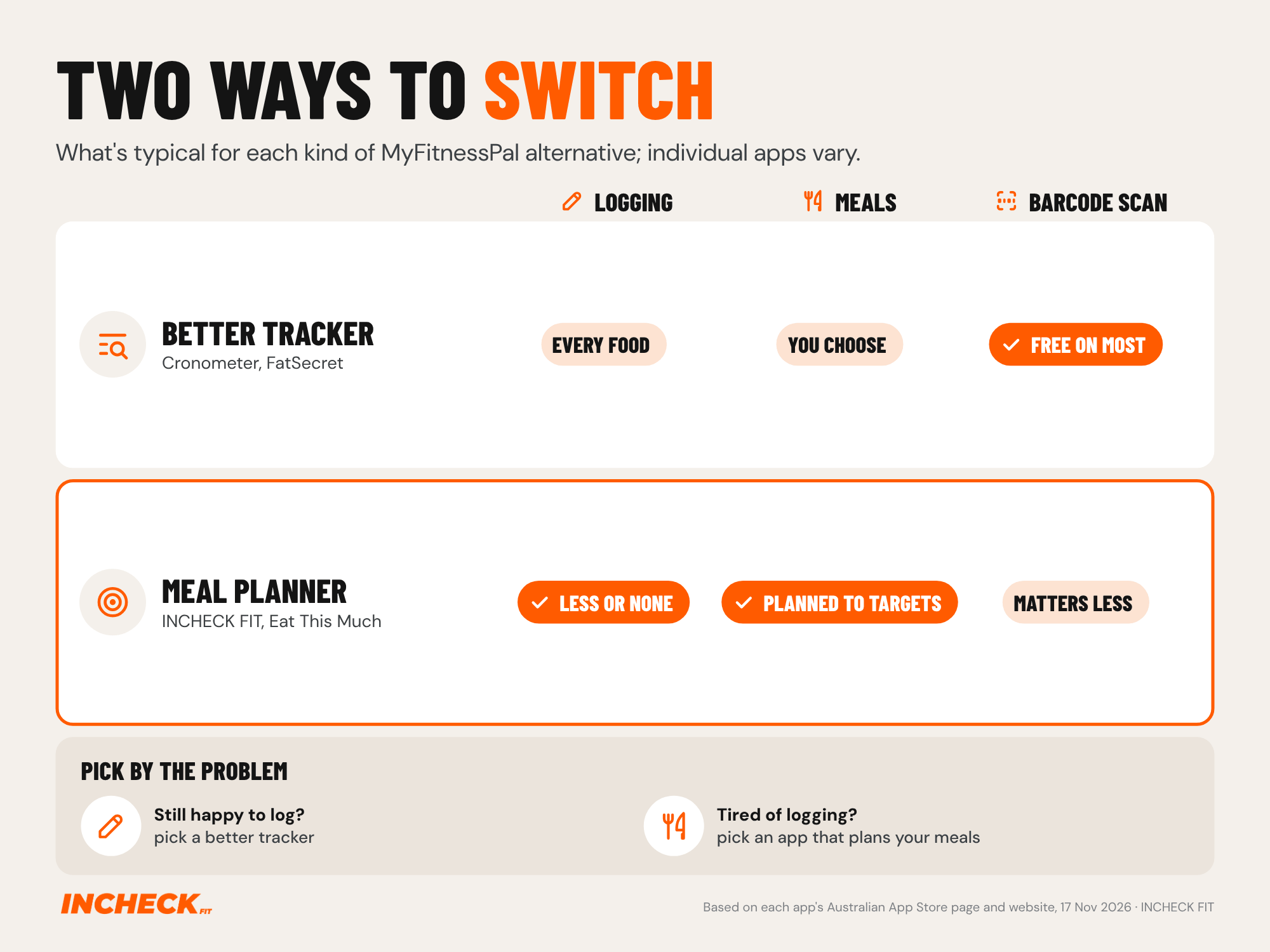
A better tracker keeps the food diary but changes the deal: a free barcode scanner, a food list built for Australia, or targets that update for you. Pick this if you like seeing every number.
A meal planner starts from your calorie and macro targets and builds the meals for you. Some still have you log or check in. Others drop logging altogether. Pick this if the daily logging is what makes you stop.
Not sure what your targets should be? Our guide to working out your maintenance calories explains where any app’s starting number comes from.
MyFitnessPal alternatives compared
In the grid below, “Not listed” means we couldn’t find it on the app’s Australian App Store page, website or help centre.
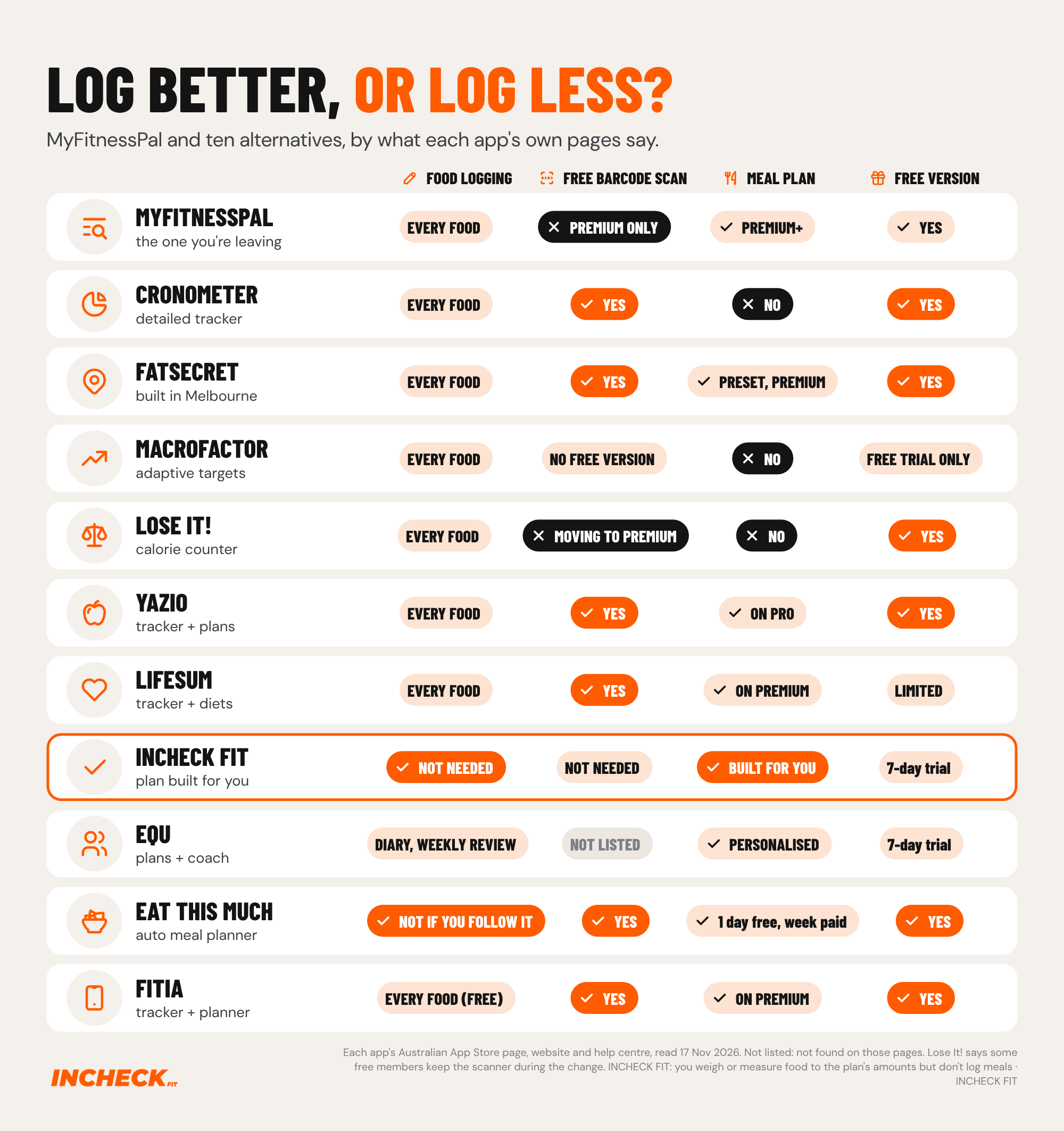
Better calorie trackers (if you still want to log)
These apps all keep a food diary at the centre. You choose what to eat and log it. What changes is the price, the features you get for free and how your targets are set.
Cronometer
What it does: Cronometer is a detailed food tracker. Its App Store page describes “a curated database of more than 1.1 million verified foods”, and its free version tracks up to 95 nutrients. The free version includes the barcode scanner (“Scan barcodes for free”), custom targets, device syncing and your own foods and recipes. Gold adds photo and voice logging, a fasting tracker, a recipe importer, Crono Coach (AI guidance), unlimited history and no ads. Cronometer doesn’t build meal plans.
Price: free, or Gold, listed at A$17.99 to A$19.99 a month (mostly A$18.99) or A$99.99 a year on the Australian App Store.
Good for: people who want a close look at vitamins and minerals, not just calories.
Less good for: anyone who wants meals planned for them. Free reports only cover a 7-day window.
Best for: detail-focused trackers.
FatSecret
What it does: FatSecret is a calorie counter and food tracker. Its Australian App Store page says it’s “built in Melbourne and tailored to Australian foods, brands and eating habits”, with “millions of verified local Australian foods”. The free version includes a “Free, unlimited barcode scanner”, plus the food diary, weight tracking, reports, recipes and a community. Premium adds photo logging (Smart Food Scan), logging whole meals by voice or text, and dietitian-designed meal plans in set styles: Keto Style, Balanced, Mediterranean, Intermittent Fasting, High Protein Low Carb and Vegetarian.
Price: free, or Premium, listed at A$15.49 or A$21.99 a month, or A$57.00 to A$87.90 a year, on the Australian App Store. No free trial is listed.
Good for: Australians who want a free barcode scanner and local foods and brands in the database.
Less good for: anyone wanting a plan built around their own numbers. Its meal plans come in set styles, and its listing doesn’t say they’re built from your personal targets.
Best for: a free, Australian-made tracker.
MacroFactor
What it does: MacroFactor is a macro tracker with what it calls a diet coach. Each week it updates your calorie and macro targets based on the food and weight you log. It doesn’t plan meals, so you decide what to eat. You can log food by photo, description, voice or barcode, and its website says it has “excellent barcode support” in Australia, among other countries. It also says, “We will never serve ads”.
Price: there’s no free version. It has a 7-day free trial, then is listed at A$17.49 a month or A$103.99 a year on the Australian App Store (a few lower and bundle prices also appear).
Good for: people who are happy to log and want their targets updated for them instead of guessing.
Less good for: anyone wanting a free app, or a menu of meals.
Best for: committed trackers who want the targets handled.
Lose It!
What it does: Lose It! is a calorie counter. Its free version covers calorie tracking, a weight loss plan and a community. Premium adds photo logging, voice logging, advanced macro and nutrient tracking, fasting and device syncing. Its “Meal Planning & Targets” feature sets targets for each meal rather than giving you a menu. Its App Store page says it has helped “over 57 million users”, and the app contains advertising.
On barcodes, Lose It!‘s help centre says it’s “in the process of moving the barcode scanner” to Premium, and that some free members still have it during the change.
Price: free, or Premium, which is sold as a yearly subscription (US$79.99 a year on its help centre). The Australian App Store lists several yearly prices and two Lifetime options, so check the current one in the app. New users get a 7-day free trial.
Good for: people who want a free calorie counter and may add features later.
Less good for: anyone leaving MyFitnessPal over the barcode paywall, because Lose It! is moving its scanner behind Premium too.
Best for: basic calorie counting on a free version.
Yazio
What it does: Yazio is a calorie tracker that also offers recipes and meal plans. Its free version includes the calorie counter, the barcode scanner, a fasting tracker and a food database of “over 4 million searchable items”. Yazio Pro adds “custom meal plans tailored to your goals”, Fitbit and Garmin syncing and no ads.
Price: free, or Pro. The Australian App Store’s subscriptions panel shows 12 months for A$59.99. There’s no monthly plan listed.
Good for: people who want a free barcode scanner and the option of meal plans later.
Less good for: anyone who wants to stop logging. The meal plans sit alongside the tracker.
Best for: a low-cost tracker with a plan add-on.
Lifesum
What it does: Lifesum is a tracker with meal plans and diet programs. Its App Store page says the app is “free to download and use with limited features”, and its website lists a “Free barcode scanner”. Premium includes meal plans, diets and more than 1,000 recipes, plus photo and voice tracking. Its help centre also lists setting your own daily calorie goal as a Premium feature.
Price: Premium is listed at A$14.99 a month or A$99.99 a year on the Australian App Store. Instead of a free trial, it offers a cheaper first period, for example A$6.99 for the first month.
Good for: people who want a tracker that also offers structured diet plans.
Less good for: anyone wanting a strong free version. Lifesum says its free version has “limited features”, and meal plans and diets are part of Premium.
Best for: trackers who like following a named diet style.
Apps that plan your meals so you log less
These apps start from your targets and build the meals for you. With some, you still log or check in. With others, there’s nothing to log.
INCHECK FIT
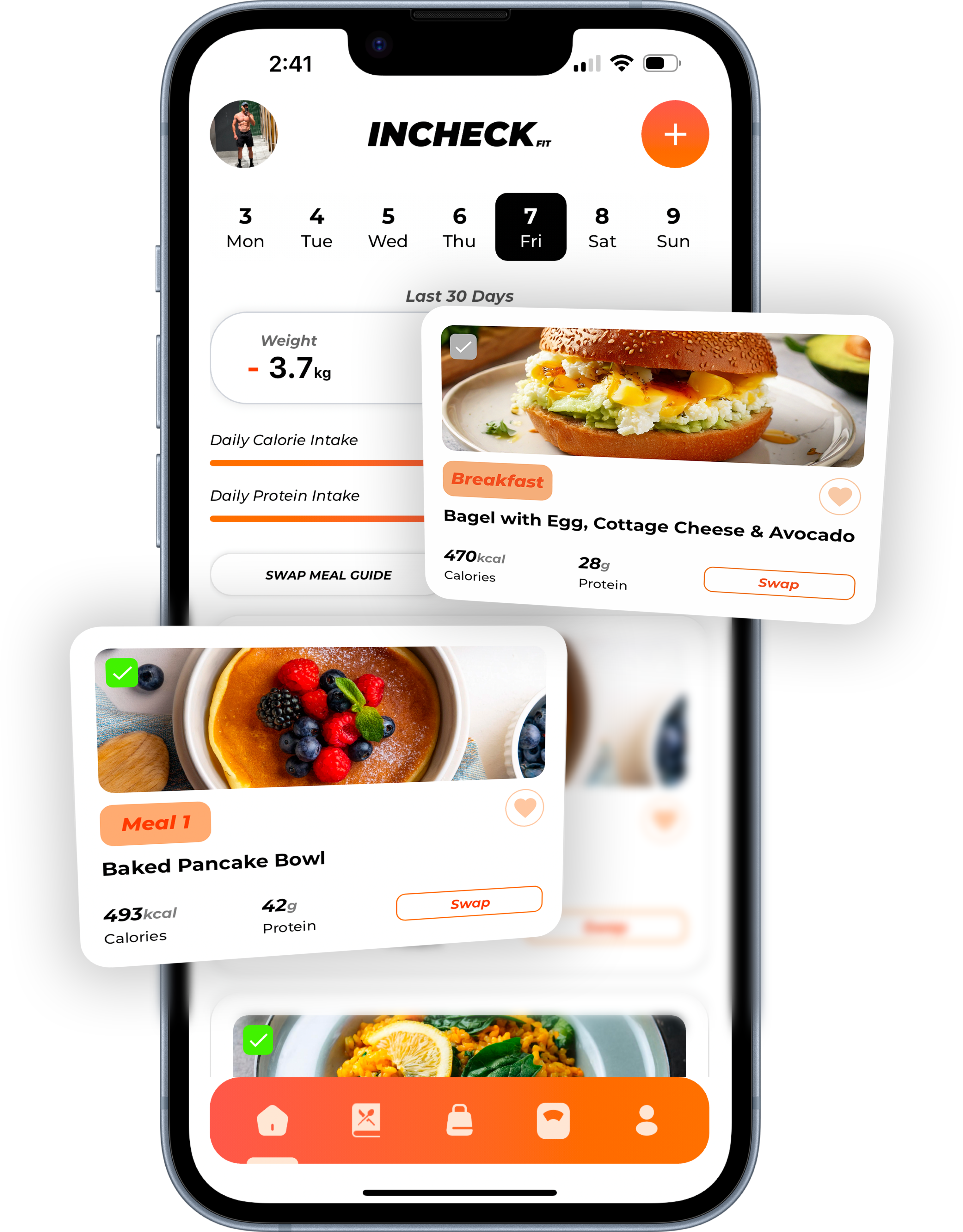
What it does: INCHECK FIT builds you a fully personalised weekly meal plan around your calorie and macro targets, your goal, your dietary needs and the food you like. Each meal comes with its quantities. You can swap recipes and ingredients, and the shopping list builds itself from the plan. Each week it reviews your progress and adjusts your targets automatically. You don’t log your meals, because you’re following a plan rather than recording what you ate. You do still weigh or measure your food to the amounts the plan gives you.
It has more than 500 recipes and plans around gluten-free, vegan, vegetarian, nut-free, dairy-free, soy-free and pescatarian diets, plus no red meat or no seafood.
Price: A$29.90 a month in Australia, with a 7-day free trial.
Good for: people who know roughly what to do but find the daily decisions and logging are what make them stop.
Less good for: people who want to choose every meal themselves. It’s also newer, with far fewer App Store ratings than the established apps, and there’s no one-to-one coach checking in with you.
Best for: eating to a fat loss or muscle goal without logging what you eat. You can start with a 7-day free trial.
equ
What it does: equ, made by the Australian company Equalution, is a nutrition coaching app with meal plans. Its website says it gives you personalised calorie and macro targets, “up to three tailored meal plans per week” and unlimited meal swaps. Its App Store page lists one full-day meal plan each week, so the two pages differ. You still track what you eat, for example with its food photo scanner, and the App Store page lists a “Weekly check-in and food diary review”. Its in-app Coach answers questions around the clock, with the option of a real equ nutrition coach. The website says Coach is free with every subscription “for a limited time”. equ says it’s “made for real women”.
Price: A$69.99 a month on the Australian App Store, with a 7-day free trial. Its website lists longer plans from $49 a month, billed as $294 every 6 months.
Good for: women who want meal plans plus coaching and weekly check-ins.
Less good for: anyone wanting to stop logging, since you still track meals and have your diary reviewed. It also costs more than twice as much as most apps here.
Best for: a plan with a coach and accountability.
Eat This Much
What it does: Eat This Much is an automatic meal planner built to your calorie and macro targets. On the free version you can create one day’s meal plan at a time, and its pricing page lists adding foods from barcodes as a free feature. Premium plans a week at a time, builds the grocery list and adds grocery delivery and automatic leftovers. Its App Store page says that with the automatic planner “there’s nothing to track because everything is already entered for you”. If you go off the plan, it says you can readjust your targets for the next week. Its website lists grocery delivery through “Instacart, Amazon Fresh, Walmart, and more”.
Price: free, or Premium, listed at A$13.99 or A$22.99 a month, or A$66.99 to A$129.99 a year, on the Australian App Store.
Good for: people who want meals chosen for them and a free version to try first.
Less good for: Australians wanting grocery delivery, as the partners it names (Instacart, Amazon Fresh and Walmart) aren’t Australian.
Best for: trying a planned day for free before paying.
Fitia
What it does: Fitia is a tracker and a planner. Its free version covers “basic food logging, calorie counting, and nutrition tracking”, and its Premium comparison table shows barcode scanning as included free. Premium “adds personalized meal plans, shopping lists, and advanced nutrition tools”, built to your calorie needs and macros, plus what it calls Smart Adjustments to your calories and meals as you go.
Price: free, or Premium, listed at A$25.99 a month on the Australian App Store, with a free trial shown on its yearly and family plans.
Good for: people who want to start free and add a plan later.
Less good for: anyone who wants to stop logging on the free version, since plans are Premium only.
Best for: a tracker that can turn into a planner.
Monthly prices in Australia
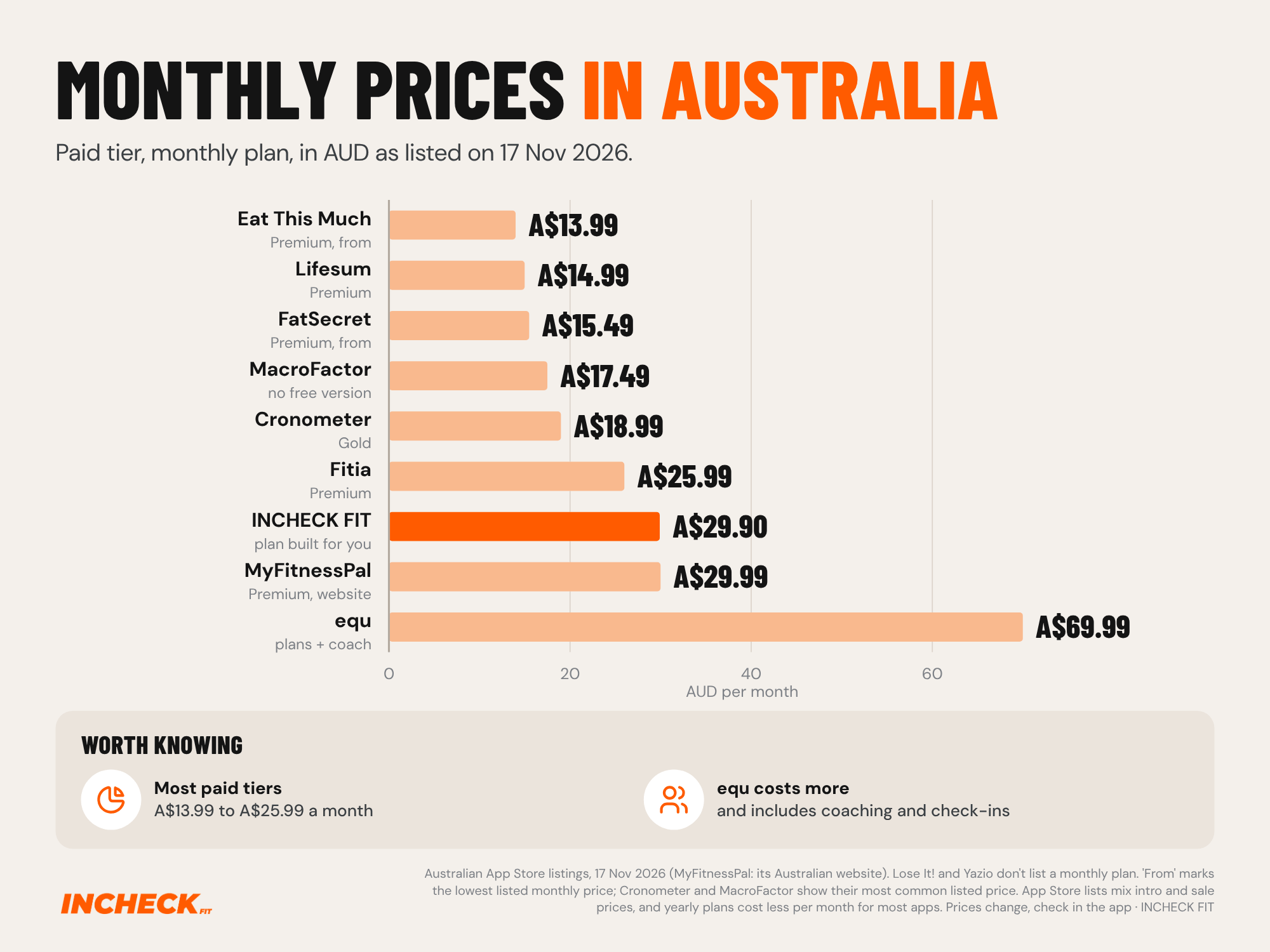
Every app in the chart except equ is listed below MyFitnessPal Premium’s A$29.99 website price. MyFitnessPal’s own App Store list also shows some Premium items at A$14.99, so check what you’d actually be charged. Most of these apps also list yearly plans that work out cheaper per month. INCHECK FIT costs about the same as MyFitnessPal Premium each month, but what you pay for is different: a plan built for you rather than a faster food diary. equ costs more again, and includes coaching and check-ins.
Which MyFitnessPal alternative should you choose?
- You want a free barcode scanner and Australian foods: FatSecret.
- You want a free barcode scanner and nutrient detail: Cronometer.
- You want your targets updated for you, and you’re happy to log: MacroFactor.
- You want a basic tracker, or one with diet plans: Lose It!, Yazio or Lifesum.
- You want to try a meal planner free first: Eat This Much, which makes one day’s plan at a time on its free version. Fitia also has a free version, but its meal plans are Premium only.
- You want meal plans with a coach and weekly check-ins: equ.
- You want meals planned to your targets, targets adjusted each week, and no logging: INCHECK FIT.
If you’re comparing more broadly, our guide to the best apps to lose weight in Australia puts trackers and meal plan apps side by side. If you mainly want a planner, see the best meal planner apps in 2026.
Frequently asked questions
-
Is there a better free app than MyFitnessPal? It depends on what you want for free. MyFitnessPal keeps its barcode scanner for Premium members, while Cronometer, FatSecret, Yazio, Lifesum, Fitia and Eat This Much all include a barcode scanner in their free versions, according to their own App Store pages or websites (November 2026). FatSecret is also built in Melbourne for Australian foods. If you want meal plans for free, Eat This Much creates one day’s plan at a time on its free version.
-
What are some good alternatives to MyFitnessPal in 2026? For tracking, the options covered here are Cronometer, FatSecret, MacroFactor, Lose It!, Yazio and Lifesum. For planning your meals so you log less, INCHECK FIT and Eat This Much build meal plans to your calorie and macro targets, Fitia builds personalised meal plans on Premium, and equ pairs meal plans with coaching. The right pick depends on whether you want a better food diary or a way to stop keeping one.
-
Is Cal AI or MyFitnessPal better? They suit different people. Cal AI logs food from a photo, a barcode or a description, but its Australian App Store page says food scanning results require a subscription, and its own FAQ says it’s “about 80% accurate”. After a 3-day free trial it’s listed from A$9.99 a month on the Australian App Store, and it doesn’t list meal plans. MyFitnessPal’s free version lets you search and log foods by hand, with barcode scanning on Premium and meal plans on Premium+. Cal AI suits people who want quick photo logging and are happy to pay for it; MyFitnessPal’s free version suits people happy to search and log by hand.
-
Why is Cronometer better than MyFitnessPal? Cronometer isn’t better for everyone, but it has two clear differences. Its free version includes the barcode scanner, which MyFitnessPal keeps for Premium. And its database is described as more than 1.1 million verified foods, with up to 95 nutrients tracked on the free version, while MyFitnessPal’s is much larger at over 20.5 million foods. Cronometer suits people who want nutrient detail and verified entries over sheer database size.
-
Is MyFitnessPal’s barcode scanner free? No. MyFitnessPal’s help centre says Barcode Scan has been available only with a Premium subscription since 1 October 2022, and as of November 2026 its Premium page still lists it as not included with a free account. Premium is A$29.99 a month or A$129.99 a year on its Australian website.
-
Is there an app like MyFitnessPal without logging? Yes. Meal planning apps build your meals in advance, so there’s less or nothing to record. Eat This Much says “there’s nothing to track” when you follow its automatic plan, and INCHECK FIT plans your week to your targets so you don’t log meals. You’ll usually still weigh or measure your food to the amounts the plan gives.
-
Does MyFitnessPal have meal plans? Yes, on Premium+, its top level. MyFitnessPal’s help centre says Premium+ adds meal planning, meal prep tools, diet preferences and grocery lists, and that the meal planner is available in Australia. Syncing the grocery list to a shopping app is limited to the US and Canada.
-
Do I still need to weigh food with a meal plan app? Usually, yes. INCHECK FIT gives you the quantities for each meal, so you weigh or measure to the plan instead of logging afterwards. What it removes is the deciding and the logging, not the kitchen scale.
References
- MyFitnessPal: Australian App Store page (apps.apple.com/au/app/myfitnesspal-calorie-counter/id341232718), myfitnesspal.com (home and Premium pages) and MyFitnessPal help centre articles on the barcode scanner (support.myfitnesspal.com/hc/en-us/articles/360032624771), Premium tiers (/34889191368077) and the Meal Planner (/34603055097869). Full page text read 17 November 2026.
- Cronometer: Australian App Store page (apps.apple.com/au/app/cronometer-calorie-counter/id1145935738) and cronometer.com/gold. Full page text read 17 November 2026.
- FatSecret: Australian App Store page (apps.apple.com/au/app/your-fatsecret-to-weight-loss/id347184248) and fatsecret.com.au. Full page text read 17 November 2026.
- MacroFactor: Australian App Store page (apps.apple.com/au/app/macrofactor-macro-tracker/id1553503471) and macrofactor.com. Full page text read 17 November 2026.
- Lose It!: Australian App Store page (apps.apple.com/au/app/lose-it-calorie-counter/id297368629) and Lose It! help centre articles on the barcode scanner, membership pricing and Premium (loseit.zendesk.com). Full page text read 17 November 2026.
- Yazio: Australian App Store page (apps.apple.com/au/app/ai-calorie-tracker-by-yazio/id946099227) and help.yazio.com. Full page text read 17 November 2026.
- Lifesum: Australian App Store page (apps.apple.com/au/app/lifesum-ai-calorie-tracker/id286906691), lifesum.com/how-it-works and help.lifesum.com (what you get with Premium). Full page text read 17 November 2026.
- equ: Australian App Store page (apps.apple.com/au/app/equ-app/id1456085024) and joinequ.com (home, Coach and Programs pages). Full page text read 17 November 2026.
- Eat This Much: Australian App Store page (apps.apple.com/au/app/eat-this-much-meal-planner/id981637806) and eatthismuch.com/pricing. Full page text read 17 November 2026.
- Fitia: Australian App Store page (apps.apple.com/au/app/fitia-calorie-counter-diet/id1448277011), fitia.app and fitia.app/premium. Full page text read 17 November 2026.
- Cal AI: Australian App Store page (apps.apple.com/au/app/cal-ai-calorie-tracker/id6480417616) and calai.app (FAQ). Full page text read 17 November 2026.
- INCHECK FIT: product information confirmed by the company (incheckfit.com).
Last reviewed: November 2026