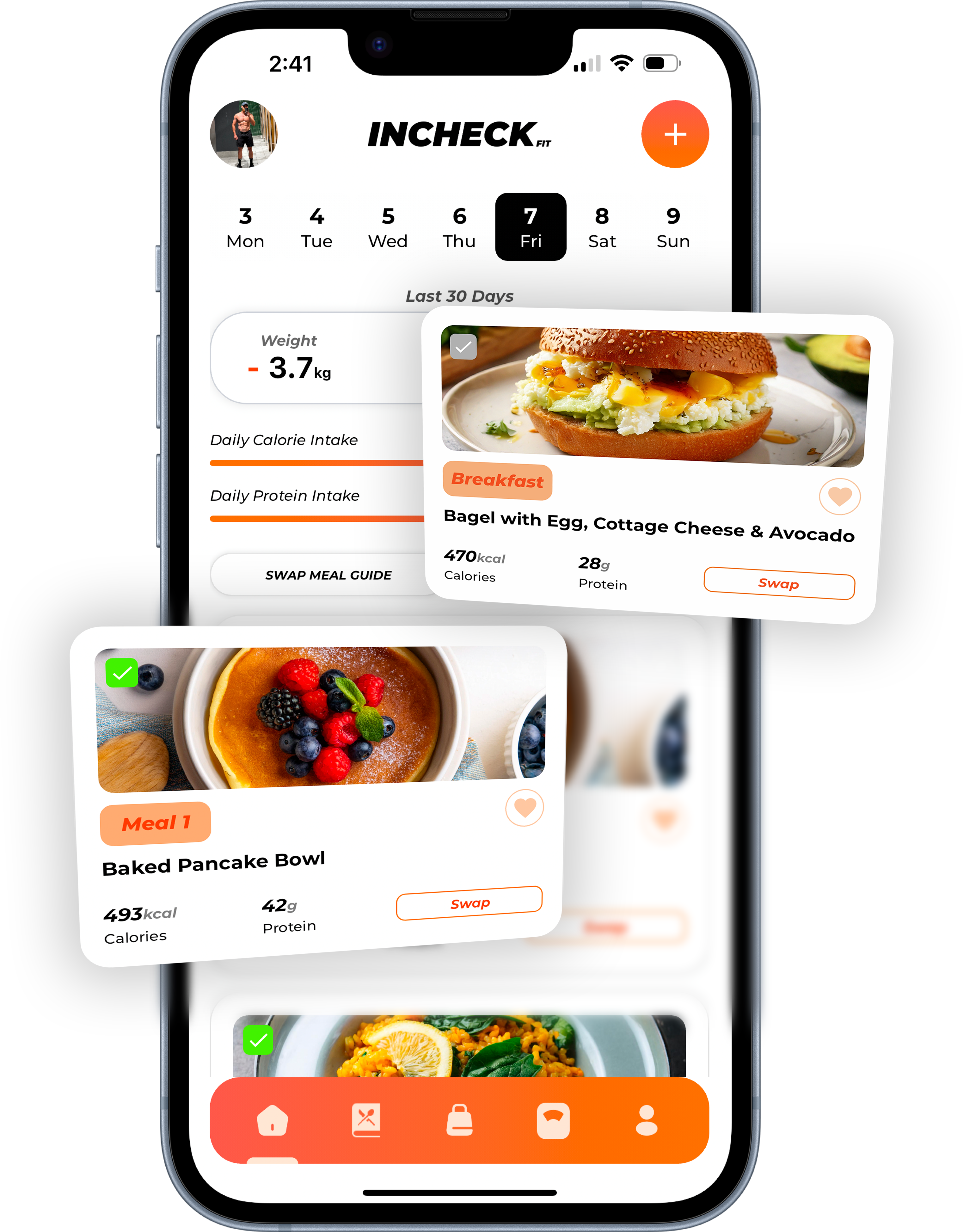
The short answer:
- The best meal planner apps in 2026 do one of three jobs: plan meals to your calorie and macro targets, add a meal plan to a calorie tracker, or organise recipes you choose.
- If you’re eating to a goal, look at an app that sets your portions for you: INCHECK FIT, Eat This Much, Prospre or Fitia.
- If you only want dinners sorted and a shopping list, a recipe planner such as Samsung Food, Plan to Eat, Paprika or AnyList does the job. Samsung Food is free, Paprika is a one-off purchase, and AnyList’s planner is US$9.99 a year.
- If you already log your food, MyFitnessPal Premium+ and Lifesum add meal plans on top.
- Mealime closes on 21 October 2026, so it’s not one to start with now.
- In Australia, INCHECK FIT costs A$29.90 a month. On monthly plans, the local services with coaching or workouts cost A$68.99 a month and up.
A note before you read: INCHECK FIT is our app, and it’s one of the ten below. We’ve described every app by what its own App Store page and website say, checked on 12 October 2026. For INCHECK FIT, we’ve also used our own product information. Prices are in US dollars from the US App Store or the company’s website unless marked A$. Prices change often, so check before you buy.
A meal planner app helps you plan what you eat this week, and most turn that plan into a shopping list. That’s where the similarity ends. Some apps only organise recipes you pick yourself. Others work out how much you should eat and build the whole week to hit it. The right one depends on the job you need done, so that’s how this guide is set out.
What kind of meal planner do you need?
There are three broad kinds of meal planner app. The difference is how many decisions they make for you.
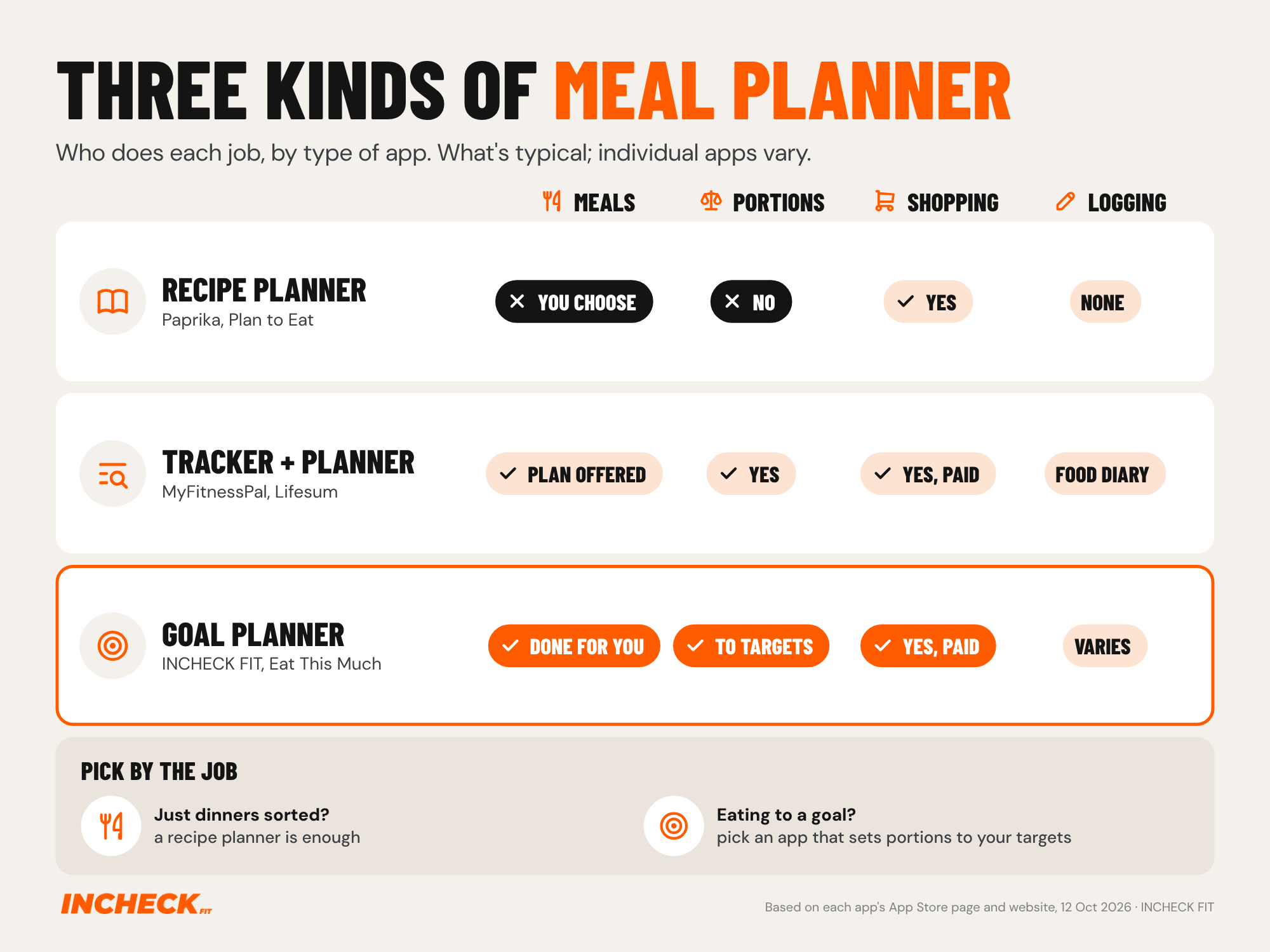
Recipe planners hold your recipes, put them on a calendar and build the shopping list. Most don’t plan to how much you should eat, though some show nutrition totals. That’s fine if your goal is “easy dinners, less food waste”.
Trackers with a planner are calorie counters first. The meal plan sits on top of a food diary, which stays at the centre of the app.
Goal planners start from your calorie and macro targets and build the meals to hit them, portions included. This is the kind to look at if you’re trying to lose fat, build muscle or eat to a number.
A recipe app can’t fix portion size. Two people can cook the same healthy dinner and get different results, because how much you eat decides the outcome. There’s more on that in eating healthy but not losing weight.
The best meal planner apps compared
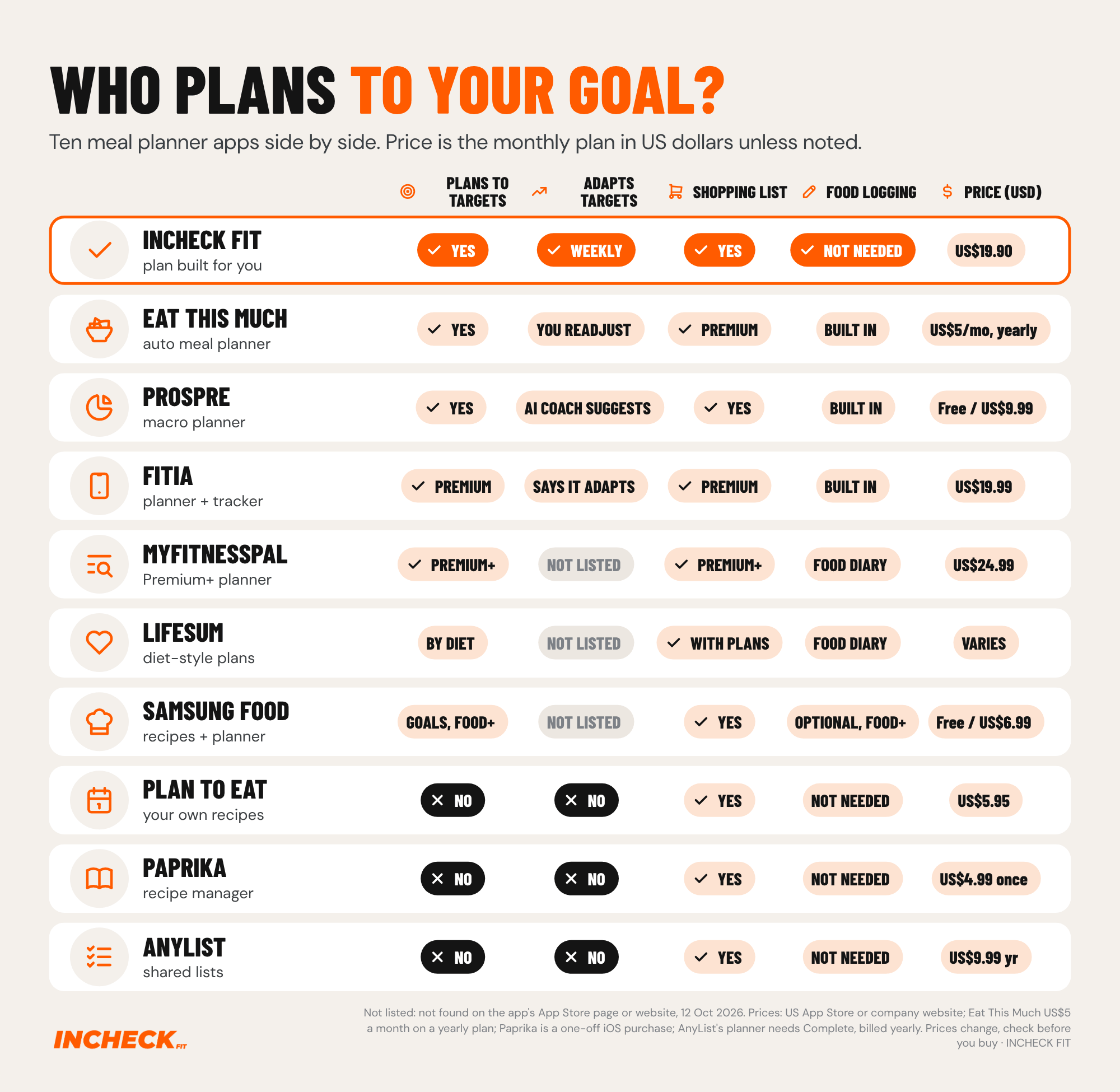
In the grid below, targets means your daily calorie and macro (protein, carb and fat) numbers. Not listed means we couldn’t find it on the app’s App Store page or website.
Apps that plan meals to your calories and macros
INCHECK FIT
What it does: INCHECK FIT builds your weekly meal plan around your calorie and macro targets, based on your goal, body stats and food preferences. Each meal comes with its quantities. You can swap recipes and ingredients as often as you like, and the shopping list builds itself from the plan. Each week it reviews your progress and adjusts your targets automatically. You don’t log your meals, because you’re following a plan rather than recording what you ate. You do still weigh or measure your food to the amounts the plan gives you.
It has more than 500 recipes and plans around gluten-free, vegan, vegetarian, nut-free, dairy-free, soy-free and pescatarian diets, plus no red meat or no seafood.
Price: US$19.90 a month on the US App Store, or A$29.90 in Australia, with a 7-day free trial.
Good for: people who know roughly what to do but find the daily decisions and logging are what make them stop.
Less good for: people who want to choose every meal themselves. It’s also newer, with far fewer App Store ratings than the established apps, and there’s no one-to-one coach checking in with you.
Best for: eating to a fat loss or muscle goal without logging what you eat. You can start with a 7-day free trial.
Eat This Much
What it does: Eat This Much builds meal plans to your calorie and macro targets, and lets you factor in budget and schedule. You can set different targets for each day of the week. If a week doesn’t go to plan, you change your targets yourself. When you log a new weight, it suggests updated targets, and you choose whether to apply them. It works with most eating styles, including keto, paleo, vegetarian and vegan.
Price: the free version plans one day at a time. Premium, which adds weekly plans and an automatic grocery list, is US$5 a month on a yearly plan, according to its website.
Good for: automated plans to an exact calorie and macro number, on iPhone, Android and the web.
Less good for: weekly plans and grocery lists need Premium, as do its grocery delivery links (Instacart, Amazon Fresh, Walmart and others, according to its website).
Best for: people who want an automatic plan and are happy to adjust their own targets.
Prospre
What it does: Prospre is a macro meal planner. You enter your calorie and macro targets, and it builds a plan to hit them, with a grocery list that includes the amounts you need. It also has a macro tracker and food diary. Its free version includes custom meal plans and grocery lists.
Price: free to download and use. Pro, which adds features such as recurring meals and repeated days, is from US$9.99 a month or US$49.99 a year on the US App Store. Its website lists a higher price, US$19.99 a month.
Good for: hitting any calorie and macro combination, with a free version that’s genuinely usable.
Less good for: you set your own targets. Its paid AI Coach suggests macro goals that “change with your progress”, but it doesn’t say it changes your targets automatically. It has far fewer App Store ratings than the big apps (about 1,100 in the US).
Best for: people who already know their macros and want a plan built to them.
Fitia
What it does: Fitia is a calorie counter and meal planner in one. It works out your calorie and macro needs, and Premium builds meal plans and a grocery list to match. Its App Store page says the plan “adapts to your goals, lifestyle, preferences, and progress”, and includes an AI coach. The free version covers food logging and calorie counting.
Price: US$19.99 a month, or around US$54 to US$60 a year depending on the offer, on the US App Store.
Good for: people who want tracking and an auto-built plan in one app.
Less good for: meal plans and grocery lists are Premium only. The App Store page lists English and Spanish.
Best for: people who like logging and want a plan alongside it.
Calorie trackers with a meal planner
MyFitnessPal Premium+
What it does: MyFitnessPal is one of the best-known calorie trackers, with more than 20.5 million foods in its database. Its top tier, Premium+, adds a meal planner with more than 1,500 recipes tailored to your calorie and macro goals, plus shopping lists from your plan. The standard Premium tier doesn’t include the meal planner.
Price: Premium+ is US$24.99 a month or US$99.99 a year on its website. The free app doesn’t include the meal planner.
Good for: people already using MyFitnessPal who want meals planned inside the same app.
Less good for: the app is built around a food diary, so it suits people happy to track. Grocery delivery syncing is US only.
Best for: committed trackers who want a plan on top of their food diary.
Lifesum
What it does: Lifesum is a calorie and macro tracker with photo, voice and barcode logging. Premium adds meal plans in named diet styles, such as keto, high protein and Mediterranean, with grocery lists included. You can adjust your daily calorie goal.
Price: Premium is sold on plans from one month to a year, and the US App Store lists introductory prices that change, so check the current offer. The free version has limited features.
Good for: a polished app with a wide choice of diet-style plans.
Less good for: you still log your food, and plans are organised by diet style. We found no mention of plans changing with your progress.
Best for: people who want structure from a named diet and a well-made tracker.
Recipe planners
Samsung Food
What it does: Samsung Food (formerly Whisk) saves recipes from any website, puts them on a meal plan and turns them into a shopping list in one click. It has more than 240,000 public recipes. You can set nutrition goals for free. The paid tier, Food+, adds weekly personalised meal plans “based on your health goals”, nutrition tracking for macros, micronutrients and calories, and tools to adapt your plans to stay on track.
Price: free. Food+ is US$6.99 a month or US$59.99 a year, with a 7-day free trial.
Good for: a big free feature set and a huge recipe library.
Less good for: the personalised weekly plans are part of Food+. Samsung says Food+ helps you stay on track with your nutrition goals, but doesn’t say its plans are built to an exact calorie and macro number.
Best for: home cooks who want recipes, a planner and a list in one free app.
Plan to Eat
What it does: Plan to Eat organises your own recipes. Its clipper saves recipes from websites and social media, you drag them onto a planner, and it builds a grocery list sorted by store and aisle. It shows nutrition totals for each day but doesn’t plan to a target.
Price: US$5.95 a month or US$49 a year on its website, after a 14-day free trial.
Good for: people with a recipe collection they already love.
Less good for: there’s no free version, and no planning to calories or macros.
Best for: organised cooks who want their own recipes in one place.
Paprika
What it does: Paprika is a recipe manager with daily, weekly and monthly meal planning calendars. Its grocery lists combine ingredients and sort them by aisle.
Price: a one-off US$4.99 on iPhone, with no subscription. Each platform (iPhone, Mac, Android, Windows) is sold separately.
Good for: paying once and owning your recipe collection.
Less good for: we found no nutrition targets on its App Store page or website.
Best for: people who hate subscriptions.
AnyList
What it does: AnyList is a shared grocery list app with recipe storage and a meal planning calendar. You can add the ingredients from planned recipes straight to your list.
Price: the shared list is free. The meal planning calendar is part of AnyList Complete, US$9.99 a year for one person or US$14.99 a year for a household.
Good for: households sharing one shopping list, with the cheapest subscription here.
Less good for: no nutrition targets, and the planner is a calendar rather than something that plans for you.
Best for: families who mainly need the list sorted.
Popular apps that aren’t meal planners
Some well-known nutrition apps come up in every “best app” list but aren’t built around planning your meals. They’re good at other jobs, so here’s where they fit.
- MacroFactor: a macro tracker that, in its own words, “auto-adjusts your macro plan every week” from the food and weight you log. It doesn’t plan your meals, so you decide what to eat and log it. It’s US$11.99 a month or US$71.99 a year on the US App Store.
- Cronometer: a detailed tracker that covers more than 95 vitamins and minerals. It has no meal plan, though Gold lets you schedule foods to appear in your diary, and you set your own targets.
- Lose It!: a simple calorie counter. Its “Meal Planning & Targets” feature sets nutrition targets for your meals rather than giving you a menu of meals.
- WeightWatchers: a Points programme where what you eat is up to you. It also sells one-to-one visits with a registered dietitian, who can build a nutrition plan around your needs.
- Noom: a behaviour change programme built around food logging. Depending on where you live, meal plans come with its Premium upgrade or as an add-on, and US members get a new plan each week for four weeks.
If you’re happy to track, these are worth a look. Our best apps to lose weight in Australia compares them side by side, with prices in AUD.
If you’re coming from Mealime
Mealime shuts down on 21 October 2026. Its closing notice says all personal data will be deleted when the app shuts down, and Mealime Pro is now free until then. Its meal planning is moving to Meals Hub, which sits inside Albertsons Companies’ grocery store apps and websites.
If you used Mealime for simple recipes and a list, Paprika, Plan to Eat or AnyList will feel familiar. If you used it to eat healthier or lose weight, pick an app that plans to your calorie and macro targets. Our Mealime alternatives guide covers how to save your recipes before it closes.
If you’re in Australia
All ten apps in our comparison are on the Australian App Store, with prices in AUD. On the Australian App Store, INCHECK FIT is A$29.90 a month, Prospre Pro starts at A$16.49 a month and Samsung Food’s Food+ is A$9.99 a month.
Australia also has a few local meal plan services that bundle in coaching or workouts.
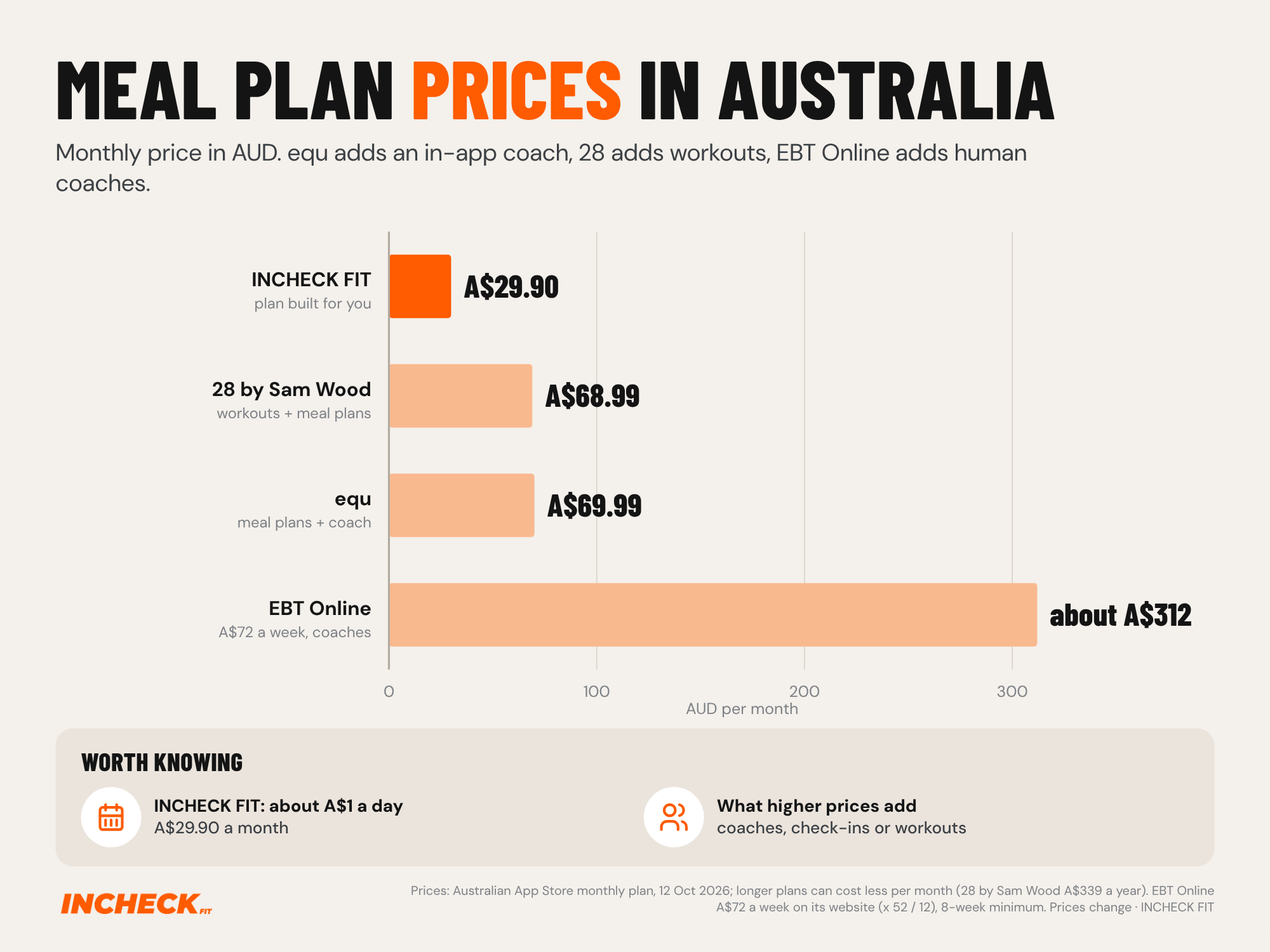
equ (Equalution): an Australian nutrition app aimed at women. It sets personal calorie and macro targets, includes meal plans and a library of more than 9,000 recipes, and runs weekly check-ins with a food diary review. It’s A$69.99 a month on the Australian App Store, and less per month on its longer plans.
EBT Online: an Australian coaching service with a team of dietitians, nutritionists and exercise scientists, and dietitian-approved meal plans. You get two single-day meal plans a fortnight and check in with your coaches every two weeks. It’s A$72 a week for nutrition, or A$95 a week with training, with an 8-week minimum.
28 by Sam Wood: a workout program with meal plans built around your macros and a weekly shopping list. It’s A$68.99 a month on the Australian App Store.
These three add coaching, check-ins or workouts on top of the plan, and you pay for that. If what you mainly need is the planning done for you, INCHECK FIT costs less than half as much on monthly plans.
Which meal planner app should you choose?
- You want meals planned to your goal, with targets that adjust each week and no logging: INCHECK FIT.
- You want an automatic plan and will adjust your own targets: Eat This Much.
- You know your macros and want a free planner: Prospre.
- You want tracking and a plan in one app: Fitia, or MyFitnessPal Premium+ if you already use it.
- You want diet-style plans in a polished tracker: Lifesum.
- You want free recipes, a planner and a list: Samsung Food.
- You want your own recipes organised: Plan to Eat, or Paprika if you’d rather pay once.
- You mainly need a shared shopping list: AnyList.
- You want regular check-ins, in Australia: equ (weekly) or EBT Online (fortnightly, with human coaches).
Whichever you pick, the plan only works if the calorie target under it is right. Here’s how many calories to eat to lose fat if you want to check the number an app gives you.
Frequently asked questions
-
Which meal planner app is the best in 2026? It depends on the job. For meals planned to your calorie and macro targets, INCHECK FIT, Eat This Much, Prospre and Fitia all build plans to a number. For organising recipes you choose, Samsung Food, Plan to Eat, Paprika and AnyList do the job, and most have a free version or a low price. Features and prices here are from each app’s App Store page and website, October 2026.
-
What is the best free app for meal planning? Samsung Food and Prospre both have free versions you can plan meals with. Samsung Food is the pick for free recipes and a shopping list, and Prospre for planning to your macros. AnyList’s shopping list is free, but its meal planning calendar needs AnyList Complete (US$9.99 a year). Eat This Much also has a free version, but it plans one day at a time and keeps the grocery list for Premium.
-
What is the best meal planner app for weight loss? Pick one that plans to your calorie and macro targets rather than one that only has healthy recipes, because portions and total calories decide the result. INCHECK FIT, Eat This Much, Prospre and Fitia all plan to targets. INCHECK FIT also adjusts your targets each week from your progress, without you logging meals.
-
Is there a meal planning app that makes a grocery list? Yes. All ten apps in our comparison build a shopping list from your plan. Samsung Food and Prospre do it on their free versions; the rest need a paid plan or a one-off purchase.
-
Is MyFitnessPal good for meal planning? It can be, if you already track in it. The meal planner is only on its top tier, Premium+, which is US$24.99 a month or US$99.99 a year on its website (October 2026); the standard Premium tier doesn’t include it. Premium+ plans recipes to your calorie and macro goals and can log planned meals for you, but the app is still built around a food diary.
-
Can ChatGPT make a meal plan? Yes, general AI chatbots can write a meal plan if you describe your goal, food preferences and calorie target. Our take: treat it as a starting point. A chatbot only knows what you tell it, so it won’t review your progress each week or adjust your targets unless you ask, and it’s worth checking the numbers it gives you.
-
What happened to Mealime? Mealime shuts down on 21 October 2026, and its closing notice says all personal data will be deleted at shutdown. Its meal planning is moving to Meals Hub inside Albertsons Companies’ grocery store apps and websites. See our Mealime alternatives guide for what to switch to.
-
Do I still need to weigh my food with a meal planning app? Usually, yes. INCHECK FIT gives you the quantities for each meal, so you weigh or measure to the plan instead of logging afterwards. What it removes is the deciding and the logging, not the kitchen scale.
-
What’s the best meal planner app in Australia? All ten apps here are on the Australian App Store. INCHECK FIT is A$29.90 a month on the Australian App Store. On monthly plans, local services with coaching or workouts cost more: equ is A$69.99 a month, 28 by Sam Wood A$68.99 a month and EBT Online A$72 a week (prices checked October 2026).
-
Are meal planner apps safe for everyone? If you have a medical condition, are pregnant, or have a history of disordered eating, talk to your GP or an accredited practising dietitian before starting any calorie-focused plan. This guide is general information, not medical advice.
References
- App features: each app’s US App Store page (apps.apple.com/us) and company website, read 12 October 2026, plus INCHECK FIT product information confirmed by the company (September 2026): incheckfit.com, eatthismuch.com (home and pricing), prospre.io, fitia.app, myfitnesspal.com/premium, lifesum.com (healthy meal plans and help centre), samsungfood.com (home and Food+), plantoeat.com/pricing, paprikaapp.com, anylist.com (Complete and help centre).
- App prices: in-app purchase lists on each app’s US App Store page and Australian App Store page (apps.apple.com/au), read 12 October 2026, and company websites where noted (Eat This Much, Plan to Eat, MyFitnessPal Premium+). Prices change and can differ on Google Play and on each company’s website.
- Australian services: equ App Store page (apps.apple.com/au) and joinequ.com (home and programs); EBT Online website (ebtonline.au) and App Store page; 28 by Sam Wood App Store page. All read 12 October 2026. EBT Online’s monthly figure is its weekly price multiplied by 52 and divided by 12.
- Mealime. Closing notice. mealime.com/closing. [Shutdown date 21 October 2026, personal data deleted at shutdown, Pro no longer charged, meal planning moving to Meals Hub in Albertsons Companies store websites and apps. Read 12 Oct 2026.] Mealime US App Store version notes: “Pro is now free for everyone.” Read 12 Oct 2026.
- Other apps mentioned: US App Store pages and company websites for MacroFactor (macrofactor.com/macrofactor), Cronometer (cronometer.com/gold), Lose It!, WeightWatchers (weightwatchers.com/us/plans) and Noom (noom.com help centre: meal and exercise plans page), read 12 October 2026.
Last reviewed: October 2026 by the INCHECK FIT nutrition team.
Last reviewed: October 2026